
Use Code: ND30 And Get 30% OFF | Get Free Delivery With No Minimum Order
-1744229570.gif "Almujtama Pharmacy logo")




Frequently bought together
Health Care & Wellness > Medical Devices And Accessories
Health Care & Wellness > Medical Devices And Accessories
Health Care & Wellness > Medical Devices And Accessories
Health Care & Wellness > Medical Devices And Accessories
Health Care & Wellness > Medical Devices And Accessories
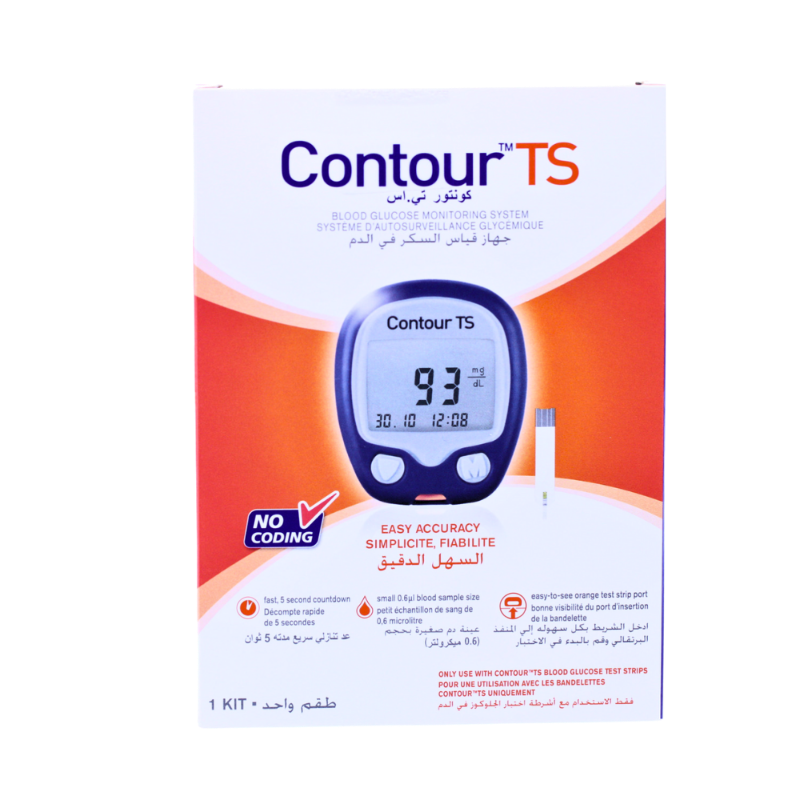
CONTOUR TS BLOOD GLUCOSE MONITORING KIT
- Sku : I-017264
Key features
The Contour TS Blood Glucose Monitoring Kit is a battery-powered glucometer designed to measure blood glucose levels in adults. The meter features a No Coding® technology, eliminating the need for manual coding before testing, and a Second-Chance™ Sampling function that prompts reapplication of blood if the initial sample is insufficient. Results are displayed on an easy-to-read screen following a 5-second countdown, with the date and time also shown alongside the reading. The kit includes a simple two-button navigation system and an easy-to-see test strip port, and the meter powers off automatically upon removal of the test strip.
- Brand: Contour
- Product Type: Glucometer Kit
- Format: Kit
- Pack Size: Kit
Frequently bought together
Health Care & Wellness > Medical Devices And Accessories
Health Care & Wellness > Medical Devices And Accessories
Health Care & Wellness > Medical Devices And Accessories
Health Care & Wellness > Medical Devices And Accessories
Health Care & Wellness > Medical Devices And Accessories
Product Features
- No Coding® Technology: No need to manually code the meter before testing, eliminating errors due to miscoding.
- Second-Chance™ Sampling: Prompts reapplication of blood if the first sample is insufficient to take a reading, helping to avoid lancing a second time and wasting strips.
- 5-Second Test Countdown: Results are displayed after a 5-second countdown from the moment blood is applied.
- Easy-to-Read Display: Features simple on-screen messages and an easy-to-read display for clear result visibility.
- Simple Two-Button Navigation: The meter is operated using a straightforward two-button interface.
- Easy-to-See Test Strip Port: The test strip port is designed for easy identification and insertion of the Contour®TS test strip.
How to Use
- Hands are washed with warm water and mild soap and dried thoroughly before use.
- The grey end of the Contour®TS test strip is inserted into the meter's test strip port; a droplet symbol appears on the monitor to indicate readiness.
- A sterile lancet is used to puncture the side of the finger.
- The side of the test strip is lightly touched to the blood droplet and held until the meter beeps, drawing blood into the strip.
- Results, along with the unit, date, and time, are displayed on the monitor after a 5-second countdown; the meter is turned off by removing the test strip.
Safety Tips
- A sterile lancet is used each time to puncture the finger, avoiding reuse of lancets.
- The test strip is inserted only into the designated test strip port of the Contour®TS meter.
- Blood is reapplied to the test strip when the Second-Chance™ Sampling prompt appears, rather than lancing a second finger unnecessarily.
- Hands are fully dried before testing, as moisture on the fingers can affect the blood sample.
Storage
- Test strips are stored away from direct sunlight and moisture to maintain their integrity.
- The meter and test strips are kept out of reach of children.
- Test strips are used before their expiry date to help maintain reliable readings.
- The meter is stored in a clean, dry location when not in use.
Similar Products

Health Care & Wellness > Braces and Mobility Aids
Health Care & Wellness > Medical Devices And Accessories

Health Care & Wellness > Medical Supplies
Health Care & Wellness > Medical Devices And Accessories
Health Care & Wellness > Medical Supplies
Health Care & Wellness > Medical Supplies
Health Care & Wellness > Medical Supplies
Health Care & Wellness > Medical Devices And Accessories

Health Care & Wellness > Medical Supplies

Health Care & Wellness > Fever & Pain Management
